Items Needed to Obtain an Emeritus / Retiree ID Card
Assure You Have All 3 Three Items to Request a UCI Emeritus / Retiree Card
1) An Active UCInetID
2) Proof of Identity
3) A Passport-like Photo of Yourself
NOTE: If you are missing any of these items Return to this page.
Step by Step Guide to Submitting 3 ID Card Items to UCI Card Services
… Go to this webpage and login.

… Choose “ACCOUNT LOGIN”
… Then, Login with your UCINetID
… Once you’ve successfully logged in

… Choose “UPLOAD YOUR PHOTO”
… Now, Read the “INSTRUCTIONS” page

… Click on “AGREE” when you’re ready to proceed
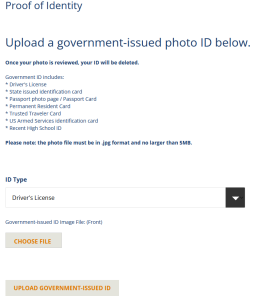
<style=”padding-left: 80px;”> … Read the “PROOF OF IDENTITY” page
… Note the list of acceptable government-issued IDs
… Select the “ID Type” you’re submitting from the drop-down menu
… Upload the photo to be used for your ID Card
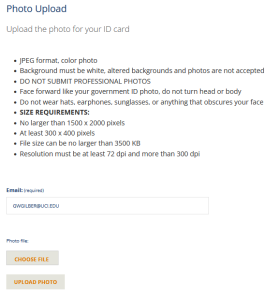
<style=”padding-left: 80px;”> … Carefully Read the “PHOTO UPLOAD” page
… Pay particular attention to the photo requirements.
… This photo must resemble a passport
Meaning, you against a white wall/background (no lines or decorations)!
… Remember not to turn your body or tilt your head
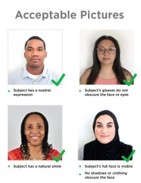
Please see the Zotkey website (https://zotkey.uci.edu/) for more examples & info on how to upload.
After your photo is approved, please email cardservices@uci.edu to have your ID printed.